Download Software

Lorem ipsum dolor sit amet, nisl elit viverra sollicitudin phasellus eros, vitae a mollis. Congue sociis amet, fermentum lacinia sed, orci auctor in vitae amet enim. Ridiculus nullam proin vehicula nulla euismod id. Ac est facilisis eget, ligula lacinia, vitae sed lorem nunc. Orci at nulla risus ullamcorper arcu. Nunc integer ornare massa diam sollicitudin.

Software Review

Lorem ipsum dolor sit amet, nisl elit viverra sollicitudin phasellus eros, vitae a mollis. Congue sociis amet, fermentum lacinia sed, orci auctor in vitae amet enim. Ridiculus nullam proin vehicula nulla euismod id. Ac est facilisis eget, ligula lacinia, vitae sed lorem nunc.

Recover Your Instant Messenger Password with MessenPass
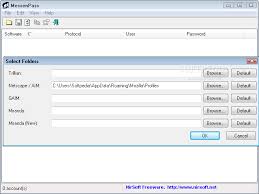

MessenPass is a password recovery tool for the following instant messenger applications. MessenPass can only be used to recover the passwords for the current logged-on user on your local computer, and it only works if you chose the remember your password in one of the above programs. The following instant messenger applications support by MessenPass :

* MSN Messenger
* Windows Messenger (In Windows XP)
* Windows Live Messenger (In Windows XP And Vista)
* Yahoo Messenger (Versions 5.x and 6.x)
* Google Talk
* ICQ Lite 4.x/5.x/2003


* AOL Instant Messenger v4.6 or below, AIM 6.x, and AIM Pro.
* Trillian
* Miranda
* GAIM/Pidgin
* MySpace IM
* PaltalkScene
* Digsby

You cannot use this utility for grabbing the passwords of other users. MessenPass can be used without any installation process, simply by running the executable file (mspass.exe) from the zip file.
If you want to install MessenPass with automatic creation of program group icons and uninstall support, download and run the self-install executable file.

When you run MessenPass, it automatically detects the Instant Messenger applications installed on your computer, decrypts the passwords they store, and displays all user name/password pairs that it found in the main window of MessenPass. If from some reason, MessenPass fails to locate the installed Instant Messenger application, you can try to manually select the right folder of your IM application by using ‘Select Folders’ option (from the File menu).

On the main window of MessenPass, you can select one or more password items, and then copy them to the clipboard in tab-delimited format (you can paste this format into Excel or Open-Office Spreadsheet), or save them into text/html files.

You can also save the passwords of your Instant Messenger applications without displaying any user interface, by using the following command-line options:

/stext Save all instant messenger passwords into a regular text file.
/stab Save all instant messenger passwords into a tab-delimited text file.
/scomma Save all instant messenger passwords into a comma-delimited text file.
/stabular Save all instant messenger passwords into a tabular text file.
/shtml Save all instant messenger passwords into HTML file.
/sverhtml Save all instant messenger passwords into HTML file. (vertical)
/sxml Save all instant messenger passwords into XML file.


MessenPass allows you to easily translate all menus, dialog-boxes, and other strings to other languages.
In order to do that, follow the instructions below:

1. Run MessenPass with /savelangfile parameter:
mspass.exe /savelangfile
A file named mspass_lng.ini will be created in the folder of MessenPass utility.
2. Open the created language file in Notepad or in any other text editor.
3. Translate all menus, dialog-boxes, and string entries to the desired language.
4. After you finish the translation, Run MessenPass, and all translated strings will be loaded from the language file.
If you want to run MessenPass without the translation, simply rename the language file, or move it to another folder.

For more infortion read : from nullsoft and download you can get from : Download MessenPass in zip file.


SpeedConnect Internet Accelerator v.7.5: Internet Connection Optimization


Easy, Fast and secure optimize your internet connection speed. You can use this optimization software to speed connection Dial-Up Modem, DSL, Cable, Wireless and LAN internet connection other.

SpeedConnect Internet Accelerator is a Windows application designed to optimize and speed up your network connection and all activities related to the internet. Accelerate the opening page website and email, faster downloads, online game more smoothly, and improve the connection on Skype. Easy, safe and fast optimization of your internet connection.


Support OS : Windows® Vista™, XP, 2000.


SpeedConnect Connection Tester
Provides a quick way to analyze your Internet connection.

SpeedConnect Quick Optimizer’s Panel
Provides the fastest way to optimize your connection.

SpeedConnect Network Settings Panel
Provide access to the Network Settings.

SpeedConnect’s Extra Settings Panel
Provides access to manual settings to add extra.

REVIEWS
“SpeedConnect prevent fragmentation in the occurrence of transfer data and settings to optimize the TCP / IP on your Windows, in order to speed up browsing Web pages, e-mail, and downloads.”
Top 10 Internet Accelerators “PC World & CNN Computing

“If you’re bored because your internet connection slow, SpeedConnect is a safe one, quick and easy system to optimize the internet connection settings.”
WebAttack Review

“SpeedConnect can automatically work with and add a few extra settings that adjust in connection with the ISP we use the internet connection to be faster.”
InternetADVISOR

“… In a few words: Easy to use, AOL adapter support, online Help is good, support the LAN and Dun.”
ZDNet Reviews

DOWNLOAD : SpeedCon75_up [2.4Mb]
Membutuhkan .NET Framework Version 2.0 (22.4 MB)


SpamPal : Free Software for Filtering Spam


SpamPal is a mail classification program that can help separate your spam from the mail you really want to read.

SpamPal is free software, you can download and install it entirely free-of-charge. This isn’t a trial, or a crippled cut-down version to tempt you towards an expensive “full” version, or a package loaded with spyware to steal your personal details.

SpamPal sits between your email program and your mailbox, checking your email as you retrieve it. Any email messages that SpamPal considers to be spam will be “tagged” with a special header; you simply configure your email client to filter anything with this header into a separate folder and your spam won’t be mixed up with the rest of your email anymore.


SpamPal know what is spam and what isn’t by uses what are called DNSBL lists. Patterned after the famous MAPS RBL, these are lists of parts of the Internet that in one way or another facilitate spam. Any email you get from a machine on one of these lists has an increased probability of being spam. You can choose to use any or all of the freely-usable DNSBL lists.

If any of those machines is on one of the DNSBL lists you have chosen then that message will be tagged as spam. But SpamPal has a powerful whitelisting feature that allows you to ignore DNSBL listings for certain senders or for parts of the Internet. Because not everyone who uses a machine on a DNSBL list will be a spammer.

To use SpamPal you need :
1. A machine running Windows 95, 98, ME, NT, 2000, 2003 or XP.
2. A POP3 or IMAP4 mailbox.
3. A standard email program such as Outlook, Outlook Express or Eudora.

SpamPal does not work with:
* AOL
* Hotmail
* Yahoo
* Juno
* MSN
* Or any other proprietary mail system.

Source : spampal.org
Download Link : Here and Here

Note : Note that the manual is not with the SpamPal installation archive; you must read it online or download it..


Get and Download Free Karens Directory Printer 5.3.1


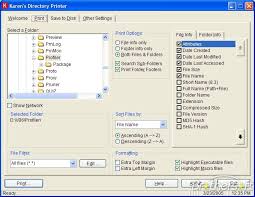
No more fumbling with My Computer or Windows Explorer, wishing you could print information about all your files. Karen's Directory Printer can print the name of every file on a drive, along with the file's size, date and time of last modification, and attributes (Read-Only, Hidden, System and Archive)! And now, the list of files can be sorted by name, size, date created, date last modified, or date of last access.

Enhancements/Bugs Fixed
Version 5.3.1: Fixed odd bug that prevented you from selecting a sub-folder of a folder found inside one of the "Special Folders" such as My Desktop.
Version 5.3.0: Added option to hide (not save or display) Hidden, System and/or Read-Only files and folders.

Version 5.2.9: Made another change that should fix the bug originally reported fixed in version 5.2.7.
Version 5.2.8: Improved handling of "remembered" UNC-style file names.
Version 5.2.7: Fixed bug that prevented proper sorting of files and folders by file size.
Version 5.2.6: Fixed bug that could cause program to crash if the last folder whose information was printed or saved doesn't exist when the program is restarted.
Version 5.2.5: Fixed bug that could cause the program to crash on computers with no available printers.
Version 5.2.4: Restored PTHash.dll file to installer, so program can once again compute and display MD5 and SHA-X hash values.
Version 5.2.3: Added warning message, when user attempts to print or save file information, with no file info items selected (ditto for printing/saving folder information with no folder info selected).
Version 5.2.2: Fixed bug that prevented program from displaying the settings folder, in the About window, when running under Windows 95, Windows 95 SE and Windows ME.
Version 5.2.1: Fixed bug that caused sorts by file creation date, date-last-modified and date-last-accessed to come out in the wrong order.


You can download from Karenware.com

MailWasher: Reliable, FREE Spam Blocker.


MailWasher is free to use and won't ever expire. It works with Outlook, Outlook Express and every other email program. MailWasher is the leader in spam filter software, and the easiest way to check and manage your e-mails before you download them. Use this powerful spam blocker software to effectively stop email spam. Discover the safe way to stop unwanted e-mails before they get to your computer.

There is no spy-ware contained in this program. MailWasher do not monitor your actions or email. When you register this program, MailWasher will not give your email address or personal details to anyone.


You will find this to be the easiest, most effective way to manage your incoming e-mails and stop spam. You will be amazed at how quickly you will like using MailWasher.

MailWasher is runs on Win 98 / Me / NT4 / 2000 / XP Home / XP Pro / Vista (all versions).

Features and Benefits
Delete. unwanted e-mails before you download to your computer. You'll be able to see who the email is from, the subject, and the attachment. This will enable you to decide if you want to delete the email or keep it. A great way to stop viruses, large attachments or to just delete unnecessary emails from getting to your computer.

Preview. Easily preview the message in your email to see what the sender has to say before downloading it to your computer. This ensures you won't download any nasty emails to your computer. Additionally, spam is marked in a red color, and your good email is marked as a green color for quick analysis.

Anti spam tools. Comprehensive anti spam tools ranging from your personal friends list and blacklist, customizable filters, external blacklists, bayesian spam filtering which quickly learns to distinguish your spam and good email and email virus filtering.

  • Friends List. Add your friends email addresses to MailWasher and they will always be recognised. You can even hide your friends from the screen so the spam is easy to recognise.
  • Bounce back unwanted e-mails so it looks as if your email address is not valid. This will make the sender think your address is no longer active so your name can be removed from their list. This unique feature is great for privacy and it couldn't be simpler!
  • Filtering. Effective filtering to automatically spot spam, plus it uses a customisable list of blacklisted e-mail senders and/or regular expressions to filter out potential spammer addresses and messages.
  • Bayesian spam filtering. This clever type of spam filtering learns which of your email is spam and which is not very quickly and accurately.

Recycle bin. If you accidentally delete an email, you can restore it back to your email account (Pro version only).

Fast download of messages, we have clocked speeds of 25 email message per second.

Simplicity. No flashy gimmicks, so easy to use that you won't feel like you have to learn a whole new program. In fact it has the familiar look and feel of Outlook Express. It's as easy as 1,2,3. Just check mail, mark for deletion/learning, then process mail.

Other features: Check mail at different intervals. Don't check mail at certain times. Play a sound when an email arrives, or be notified visually. Email log. Comprehensive help documentation on this site.

Download : MailWasher Here


Boost Your Internet Speed with Internet Turbo®


INTERNET Turbo ® is the AWARD-WINNING Internet solution, which is easily completed two issues of the Internet's most popular:
1. Performance of the slow connection.
2. Disconnect is often not desired.

INTERNET Turbo can prevent the data transfer protocol, TCP / IP fragmentation. With use, you can improve the performance of your internet connection up to 200% (we also get a report the user to 300% improvement).


NTERNET Turbo also has fiture Forever Connection, where this feature will prevent you from disconnected by your ISP (Internet Service Provider). Most Internet Service Providers have time off, they will decide on an internet connection.

Highlight
  • Supports all software and hardware adapters.
  • Easy menembalikan Windows default settings.
  • Wizards automatically configure dialup, LAN, ISDN, Cable, xDSL, and more.
  • Wizards to manually configure dialup, LAN, ISDN, Cable, xDSL, and more.
  • Easy to Make registry backup.
  • Improving MaxMTU, RWIN, TTL, Session Keep Alive, PMTU and NDI Cache.Mencegah being disconnected by your ISP (Internet Service Provider)
  • Includes a comprehensive help file.

INTERNET Turbo save much time and money. INTERNET Turbo is a tool for every person using an internet connection. INTERNET Turbo will increase the performance of any software associated with the Internet, such as browser / email programs, CompuServe, RealAudio, RealVideo, ICQ and others. It also does not prevent the separation desired.

Website : http://www.clasys.com/internet_turbo.html
Download Link : Here or Here

A-one DVD Creator 5.85


Developer: A-one Global Creativity
License: Demo , Price $ 24.95
Size / OS: 11.5 MB, Windows All

A one DVD Creator description
An expert and easy-to-used Windows application that creates your favorite DVD movies directly

A-one DVD Creator is an expert and easy-to-used Windows application that creates your favorite DVD movies directly.

With A-one DVD Creator, you may transcode and burn internet movie files into DVD disc, or you can save file to hardisk.

With DVD encoding and burning engine integrated you can easily Merge up to 4 hours of multiple movies or episodic files to standard MPEG2 Video and burn it into a DVD R/RW disc that playable on car or home DVD player.

A-one DVD Creator supports
the most popular formats on the internet such as Divx, Xvid, Mov, AVI, WMV and streaming formats.

A-one DVD Creator is a 1 click solution to burn DVD movie from huge internet movie resources.

Here are some key features of "A one DVD Creator":

· Create AVI, MPEG, MOV, DIVX, WMV to standard DVD without losing quality.
· Support Divx, Xvid, AVI, MPG, MOV, WMV video format.
· Converts each chapter to an individual file.
· Support Setting the start position and end position of source file to create.
· User-friendly interface without any complicated settings.
· Estimate output file size before creation.
· Automatically Shutdown Computer After Long Time Conversion


Requirements:

· Intel Pentium II 1GHz or above
· 128 MB RAM or above


Limitations:

· 20 percent file size conversion

Download Location