Download Software

Lorem ipsum dolor sit amet, nisl elit viverra sollicitudin phasellus eros, vitae a mollis. Congue sociis amet, fermentum lacinia sed, orci auctor in vitae amet enim. Ridiculus nullam proin vehicula nulla euismod id. Ac est facilisis eget, ligula lacinia, vitae sed lorem nunc. Orci at nulla risus ullamcorper arcu. Nunc integer ornare massa diam sollicitudin.

Software Review

Lorem ipsum dolor sit amet, nisl elit viverra sollicitudin phasellus eros, vitae a mollis. Congue sociis amet, fermentum lacinia sed, orci auctor in vitae amet enim. Ridiculus nullam proin vehicula nulla euismod id. Ac est facilisis eget, ligula lacinia, vitae sed lorem nunc.

Free Norton Security Scan with Google Pack Software

Norton Security Scan is not equally powerful as Norton Internet Security 2008 to protects the PC from all the viruses, spyware and adware. But protection offered by Free Norton Security Scan is very good and in identifying viruses and spyware works much better than any other free antivirus systems available in the market.

Download 41 Freeware

This is some links to download freeware that may be useful for you and certainly to my own :) :
  • Internet’s Top Freeware Lists!
    Listing the web’s top freeware. Most popular and useful freeware to download and enjoy absolutely free!
  • VistaFiles.eu
    Download portal with tons of freeware and shareware programs and games for Windows Vista OS.
  • FreewareUpdates.info
    Freeware Updates - we are watching the versions for you!
  • Downloads Machine
    The UK’s biggest custom made freeware factory.
  • Top Freeware
    A quality list of freeware and some good tips to optimize your system. Also download some rare freeware that has now gone shareware.
  • Freeware Guide
    Daily news of freeware updates, Program of the Month, Top 10 Freeware, Freeware links
  • Safe Disk
    Safe Disk is a program that allows the creation and use of virtual encrypted drives.
  • Crobasoft
    Download more than 10 freeware games, chat in forums, view comics and download game making tutorials.
  • Dragonfreeware

    Freeware program downloads and links to other freeware sites.
  • Download.hr
    Download portal with tons of freeware and shareware programs and games.
  • Liquid Links
    Liquid Links is dedicated to finding you the best FREEWARE sites on the web!
  • The Freeware Outpost
    growing set of selective freeware listings. proud member/supporter of The Freeware Revolution
  • Last Freeware version
    jv16 Powertools, RegCleaner, PowerArchiver, PopCorn, Mailwasher, DDTitle, FolderSizes, TxEdit
  • Measurement And Conversion Software
    Free hiqh-quality software for measurement and conversion tasks. Here you’ll find stopwatches, speaking clocks, graphically-interactive unit converters.
  • Link Verify
    Webmasters verify your affiliate and reciprocal links with your trading partners. Automatically check for your link on other sites with Link Verify.
  • Webresources Freeware Links
    free software, free applications, free downloads, educational software, file managers, antivirus, windows games downloads, planners, fax, schedulers, calendars…
  • Apps of the Web
    Freeware download site - also offers forum and articles for webmasters.
  • The Freeware Motherload!
    Nothing but the Best! Download ‘Select’ FREE Windows Software and Utilities from 8 major categories & 40 sub-categories!
  • BoostWare
    Here you can download freeware tools to boost up your hardware and operating system.
  • payatec
    freeware of security products and services
  • 4ComTech - Smart Customized Freeware Web Browser
    Intelligent themed web browsers of different subjects that automatically find related URLs associated to the current website you’re viewing.
  • Free Tools
    Free Tools is a selective directory of links to sites that offer outstanding free software, services, and resources.
  • Aroundnet
    Top 50 Software sites.
  • Hitboss
    Software TOP 100
  • click-now.net
    Download free software, ebooks, tutorials, videos, wallpapers, games, drivers, patches…
  • Freeware Awards
    Freeware Awards is awarding freeware developers whose software meets stringent criteria and which we find extremely useful ourselves.
  • Quantum Illusions
    A great freeware site with many catergories and many links to other freeware sites.
  • Absolute Free Software
    A collection of absolute freeware specially selected and tested. No time bombs, No fees to pay, only Absolute Free Software.
  • PC Freeware
    Download old, but useful Windows freeware.
  • Freestop
    Freeware programs and links to freeware sites.
  • Hotwinfiles
    The hottest place to download freeware on the net today.
  • Knighttech Freeware
    Features a Cool Mpg/Mpeg Video Player and more to come
  • ZeroPlus2 Freeware
    ZeroPlus2 offers freeware, free graphics, animated gifs, software reviews, tips and tricks.
  • Bestpcfreeware.com
    Bringing you the BEST and LATEST free-software for your PC.
  • Ioannis Zenas Freeware
    Completely free utilities and applications for windows.
  • Freeware Gamer
    Full version freeware games with download URLs.
  • Brownie Entertainment
    Free software. CD Madness is the best program for CD drives and CDs.
  • Homepageware
    Freeware, Shareware and lots of other cool stuff.
  • FreeGamesWeb.com
    The BIGGEST site with the BEST Free Games, 1000`s of visitors each day can`t be wrong…
  • iBrowser - freeware image viewer
    iBrowser - an efficient image viewing and browsing utility.

CoffeCup Free Zip Software

Zipping and Un-Zipping has never been easier!

CoffeeCup Free Zip Wizard makes it easy to zip and unzip files. It has built-in e-mail and FTP functions, so you can zip and send your files in one easy step. Free Zip Wizard can also run any program or setup file inside ZIP files. It can also create self-extracting EXE files and find all the ZIP files on your system, too.

CoffeeCup Free Zip Wizard walks you through the process of opening, creating, modifying, or finding a ZIP file. Create a self-extracting ZIP file, labeled actually as a EXE file, to make distribution a breeze. This method will allow the person receiving your file to simply double-click and open the file to get the files you archived.

Some Features of Free Zip Wizard


Get This Software from CoffeCup

Get The Best Free Software for Your Computer

Internet:

Mozilla Firefox

Since I know Firefox, I was stopped using IE and I use Firefox now. Maybe you’d probably know that Firefox is a better browser than IE.

First, it renders web pages as they should really look like.

Secondly, it has tons of great features (tab browser, security features, live bookmarks, etc.).

It’s much less prone to viruses, unlike IE which can easily be targeted by bad software through its ActiveX controls.

It really looks better. And if there’s something you want in your browser (like the ability to create pictures from webpages or save entire websites), Firefox has hundreds of extensions that you can install (also freely) to improve web browsing.
Firefox is running on Windows, Linux and Mac and you can download from Mozilla Firefox

Mozilla Thunderbird

Thunderbird is the Email Client and brother of Firefox. It also supports RSS feeds and News feeds, has built-in security features and has hundreds of extensions for those who want a little more. You can get it’s from Mozilla

Office Software :

OpenOffice.org Writer

The programs have a very similar interface with the MSOffice programs, making them easier for your use. Plus, they support open standars (which is the future of your documents) and they are very easy to install.

You can get them through the OpenOffice.org Website.

Free and open source music player:

musikCube

MusikCube supports the usual MP3s that we all use, like iTunes and Windows Media Player. But aside from that, you can install other extensions that will make it play other audio formats, like ogg, wav, wma and even aac files (yup, iTunes and iPod music files!).

It can rip directly from your cds and it has a very nice and minimal user interface. Other great feature is being able to connect to a FreeDB server to retrieve music information.

Aside from your Music Library, there’s also a Collected Library, where new music files will appear, in case you don’t want them to be in your Library immediately. You can find out more about musikCube and download the program from the musikCube Website.

Photo or Art Software:

The GIMP

The GIMP (which stands for GNU Image Manipulation Program) is a program for digital image editing (Photoshop alternative). Like Photoshop, it supports layers, custom shapes, brushes and a host of other image editing tools. You can download the GIMP at the GIMP.org website.

Scribus

Scribus is a desktop publishing software (InDesign/Publisher/Pagemaker alternative), for those who want to create newsletters, magazines, posters and other nifty printed materials. It is certainly better than using Pagemaker or Publisher–or worst, Microsoft Powerpoint or Word–for creating your printed stuff. You can download it at the official Scribus website.

Inkscape

Inkscape, is a vector illustration software (Illustrator alternative). If you’re into drawing and nice vector illustration, then you’ll certainly going to like Inkscape. Inkscape is just as robust as Adobe Illustrator. It’s great for illustration work, and is certainly one of those free apps that should be on every creative person’s computer
. You can grab your free copy at the Inkscape Website.

Samsung PC Studio 3.20 for Samsung Mania

If you have a Samsung multimedia phone then Samsung PC Studio 3.20 is just the application you need. It lets you convert all types of multimedia material in Windows to your Samsung mobile phone, with perfect synchronization between PC and phone.

Thus from the PC you can manage and administer all the multimedia content you have, you can access your SMS, transfer videos, photos, music, etc, create new contacts, write multimedia SMS/MMS, convert between different video and audio formats, etc.

In other words, you can control, from your PC, all your Samsung phone options more comfortably and effectively, at the same time as synchronizing multimedia material between the two.

To work correctly the program needs you to previously install DirectX 9.0 or later. If you don´t have it you can download it for free here in 1001Download

Get Free Applications for MacOS

Here are some free applications you can download and add to your MacOS.

Adium

Adium is an application that has the same functionality with the iChat application that has been in MacOS. But a few weaknesses in iChat is only working with the account Mac.com and AIM. While for a chat on other networks such as MSN, Yahoo, Jabber and Google Talk we need another application. One application that is Adium. Because the application Adium we can chat on a network other than the Mac.com and AIM as in MSN, Yahoo, Jabber and Google Talk or the other.

If interested in this application, may be trying to download from http://adiumx.com

VLC

Videolan or VLC Client is an application that is able to play any video format. This is one of my favorite multimedia software because only with this application almost all video formats can be played. So for the regular MacOS applications already have Quicktime, but not all video formats can be played by Quicktime.

So for those of you who like or want to try VLC, this application can be download in http://www.videolan.org/vlc

Handbrake

If you frequently burn the DVD, iDVD is an application that is provided by Apple. But the application is to prioritize in which you want to produce DVDs. For you who just want to make backups of data will have difficulty.

To overcome this problem you can use Handbrake, because this application can backup DVD to MP4 format or AVI using the Xvid codec or H.264 for video. While using the audio codec to AAC, MP3 or vorbis.

To get this application you can download from http://handbrake.fr

Mozilla Firefox

Although in the “MacOS” existing “Safari browser”, but this browser still has some weaknesses. And in this case may well have included 1 browser and recommended that the browser is Mozilla Firefox. Forefox Mozilla browser at this time to be number 1 the most compatible with many existing sites.

Then another browser you can install is the “Camino”. Camino is a browser that looks more integrated with the MacOS.

To get Mozilla Firefox, you can visit http://get-firefox.com while in the Camino browser for http://camino-browser.org

Unarchiver

This application is similar, such as WinZip or winrar, which also functions as Unarchiver applications to compress / uncompress. This application can open the file with the format zip, tgz, rar and 7-zip. This application can be used as an alternative to Stuffit Expander.

When you want this application, you can download the address http://wakaba.c3.cx/s/apps/unarchiver.html

Quicksilver

Quicksilver was launched for users who prefer using the keyboard. By using the hotkey (usually the default Ctrl + space) and type the name of the application plus enter the application will open. And there are some plugins that will develop the function Quicksilver not just starter application.

And to try this application, you can visit the site http://quicksilver.blacktree.com

And for you to be a MacOS user who has a sense less satisfied with some of the existing applications or applications that are written above, it may be able to visit the site freemacware. Because there are many applications for the MacOS, there is a free application and the application that must be paid.

Get and Trying AutoRun Design Specialty

AutoRun Design Specialty is a more powerful visual tool to create professional autorun (autoplay) interfaces and presentations for your CD/DVDs. It is the easiest way to create, edit professional autorun (autoplay) interface and generate autorun files for CD/DVDs in a WYSIWYG environment, just click, point, place and test (preview). So all is visual, fast, simple. AutoRun Design Specialty is easy to learn, with demos and wizards you can get started in just minutes!

Main Page, Splash Screen, Screen Background, Agreement Form, Security Form, Exit Form and unlimited Sub Pages. Page Shadow, Page FadeIn and FadeOut, and many effects.
19 Objects: Button, ImageButton, Image, Bevel, Label, ALabel,ALinkLabel, Text, ScrollText, Memo, RichText, Flash, Browser, AVI, MediaPlayer, SlideShow, Edit, RadioButton and CheckBox.
Page Template and Object Template make it more easy.

Features:

* None (No nothing.)
* Open File (Opens a file with its default viewer application or Runs an executable program.)
* Visit Website (Opens a web-based URL in the user's default Web browser.)
* Browse Cd/Folder (Opens a Folder or browse cd)
* Send Email (Opens the user's default email client with an email address in the "email" field.)
* Print File (Prints a document on the user's default printer. This is the same as selecting "print" and Click the Browse button chose the file you wish to print.)
* Show SubPage (Show a sub page in your project.)
* Play Sound (Play a multimedia file such as an MID, AVI, MPG, audio format or any other multimedia type whose player supports the Play shell command.)
* Stop Sound (Stop the multimedia file in the current page.)
* StopAll Sound (Stop all the multimedia file in all pages.)
* Full Screen (only support the objects of mediaplaye and slideshow ) (Set the object of mediaplayer or slideshow to full screen.)
* Show Message (Setting your custom messages for user.)
* Play (only support the objects of mediaplaye and slideshow ) (Play an multimedia file such as an MID, AVI, MPG, audio format or any other multimedia type whose player supports the Play shell command.
SlideShow show pictures as an folder whose player supports the Play shell command.)
* Stop (only support the objects of mediaplaye and slideshow ) (MediPlayer Stops playing or recording.
SlideShow stop show pictures as an folder whose player supports the Stop shell command.)
* Pause (only support the objects of mediaplaye and slideshow ) (MediaPlayer Pauses playing or recording.
SlideShow Pause show pictures as an folder whose player supports the Stop shell command.)
* Previous (only support the objects of mediaplaye and slideshow ) (Previous an multimedia file .
SlideShow previous pictures as an folder whose player supports the enters quickly shell command.)
* Next (only support the objects of mediaplaye and slideshow ) (Enters quickly an multimedia file .
SlideShow enters quickly show picture as an folder whose player supports the enters quickly shell command.)
* First/Back (only support the objects of mediaplaye and slideshow ) (First/Back an multimedia file such as an MID, AVI, MPG, audio format or any other multimedia type whose player supports the Play shell command.
SlideShow First/Back show picture as an folder whose player supports the enters quickly shell command.)
* Last/Step (only support the objects of mediaplaye and slideshow ) (Last/Step an multimedia file such as an MID, AVI, MPG, audio format or any other multimedia type whose player supports the Play shell command.
SlideShow Last/Step show picture as an folder whose player supports the enters quickly shell command.)
* Minimize (Minimize the current page supports the minimize shell command.)
* Exit(This action will exit the application or the current page.)
* New AutoRun Step by Step.
* Set the title of your project and use custom hint.
* Save test it.
* Preview page.
* Use you custom ico for you project.
* Page support fadein,fadeout,transparent.
* Publish your cd with your cd burner.
* Page templates.
* Object templates.

Get the Files from www.alleysoft.com this software supports Windows95/98/Me/NT4/2000/2003/XP/Vista

Make Your Copy Faster with RichCopy

One of the few free program from Microsoft that is useful RichCopy. This application is first called RoboCopy developed by Microsoft engineers named Derk Benisch to the internal. That time has not yet inter-face, so you must understand the command-line to be able to use it. 2001 made Robocopy dengn GUI (Graphical User Interface) that is still simple.

And by Ken Tamaru the application continues to be developed and finally in this year’s application is not only issued with a new look but also with a new name, namely RichCopy that have been more perfect and can be used by many people.


Unlike the process usually have a copy in the Windows file copy between the sequential one with the other. RichCopy can copy multiple files in parallel (multithread) so that the process can run faster.

RichCopy very useful when you copy many files or move files that are large. This application allows you to make a pause and resume the process of transfer is running, so as if you are download files from the internet with a download manager.

If you want to get the program, you can download from download.microsoft.com . But you must remember, this free utilities, RichCopy is provided as-is, and it’s not supported by Microsoft.

Source : becouz.net


8 Tools to Fix Infected Computer

Autoruns fix
AutoRun Fix is a free program that serves to activate and deactivate the role of Autorun.Do not know what is the Autorun?it is simply self-system disk CDs and DVDs, or makes goals when a disc into the CD-ROM tray, run automatically without having to press any button.

This simple program, Autorun Fix, consists of only two buttons, used to enable or disable this function respectively self-executing in our system.The only requirement for our decision is implemented is reboot later.AutoRun Fix also be able to use to activate or deactivate the assistant cameras, scanners and other devices.Another advantage of the program, in addition to its small size, is that it's entirely in Spanish.

Download Link : software.emule.com

FreeCommander
FreeCommander is an easy-to-use alternative to the standard windows file manager. The program helps you with daily work in Windows. Here you can find all the necessary functions to manage your data stock. You can take FreeCommander anywhere - just copy the installation directory on a CD or USB-Stick - and you can even work with this program on a foreign computer.

Get File from : www.snapfiles.com

Process Explorer
Process Explorer show you information about which handles and DLLs processes have opened or loaded.

The Process Explorer display consists of two sub-windows. The top window always shows a list of the currently active processes, including the names of their owning accounts, whereas the information displayed in the bottom window depends on the mode that Process Explorer is in: if it is in handle mode you'll see the handles that the process selected in the top window has opened; if Process Explorer is in DLL mode you'll see the DLLs and memory-mapped files that the process has loaded. Process Explorer also has a powerful search capability that will quickly show you which processes have particular handles opened or DLLs loaded.

The unique capabilities of Process Explorer make it useful for tracking down DLL-version problems or handle leaks, and provide insight into the way Windows and applications work.

Download Link : download.sysinternals.com

RunScanner
RunScanner is a freeware windows system utility which scans your system for all running programs, autostart locations, drivers, services and hijack points.
You can use Runscanner to detect changes and misconfigurations in your system caused by spyware, virusses or human errors.

Download link: www.runscanner.net

Process Master
Process Master is an advanced utility for hidden processes detection and killing. These processes usually are the results of the virus, spyware and rootkits activity. And you will not be able to see them using Windows Task Manager. Process Master uses advanced low-level system technics to detect hidden processes. It successfully detects the presence of such famous rootkits as HackerDefender and Fu.
Dowload link : freedownloadscenter.com

isReset
Some malware do change your files attributes to system/hidden but when you want to change them back to normal you wont be able to do that because the options are grayed.

isReset resets your system/hidden files/folders so you can view/access them normally.

Download from : wareseeker.com

RegAlyzer
RegAlyzer application was designed to be a tool that will help you browse and change the registry. RegAlyzer was created because of a few features we missed in the original regedit tool, from support for exotic value types over background and regular expression search to better bookmarks, displaying .reg files in the accustomed style and a history view.

Download from : filecluster.com

Task Manager Fix is a FREEWARE system utility to fix task manager disabled by spywares, trojans and displays error message : Task Manager has been disabled by your administrator“, which blocks access to Windows Task Manager.

When you try to open Windows Task Manager, by pressing CTRL+ALT+DEL the following error often appear:

Task Manager has been disabled by your administrator

INSTANT solution to common problem - “Task Manager Not Working”

Download Link: www.taskmanagerfix.com

12 Popular AntiSpam

IE 7pro: Ad-free surfing with the IE.IE7Pro is a must have add-on for Internet Explorer, which includes a lot of features and tweaks to make your IE friendlier, more useful, secure and customizable.

SpamAware: The application is completely functional after installation and gets automatically active on new mails. It supports Black- and Whitelist filtering and is able to automatically add all your Outlook and Outlook Express contacts and add recipients of mails you write to the Whitelist.

SPAMfighter: A tool for Outlook and Outlook Express that automatically filters spam and phishing attempts.

Cloudmark Desktop: The simplest, most effective spam-blocker for Microsoft Outlook and Outlook Express.

SpamPal: Assigns a special tag to incoming spam messages.

Spam Terrier: It is a powerful, self-learning spam filter that can be deployed and used with popular email clients to keep unwanted messages out of your inbox.Monitors POP3 and IMAP account accesses.


WPoison: It is a free tool that can be used to help reduce the problem of bulk junk e-mail on the Internet .It helps to combat the junk e-mail problem by effectively thwarting the efforts of junk e-mailers who regularly scan web pages, looking for target e-mail addresses to harvest.

MailWasher is the award winning,reliable, FREE spam blocker.It works with Outlook, Outlook Express and every other email program.

BullGuard Spamfilter protects you from spam and phishing attempts. Phishing attempts can be costly as they are designed to steal personal information like credit card numbers.It has complete Outlook, Outlook Express and Thunderbird integration.

Spamato filters POP and IMAP accounts for spam with the potential for high precision and plug-ins that make it easy to use in Outlook and Mozilla Thunderbird.

Comodo AntiSpam :Install Comodo AntiSpam for free and reclaim your inbox. The unique Passcode technology authenticates the sender of every mail – a system that automated spam bots can’t get around.It works with all current Windows operating systems and supports email programs such as Outlook, Outlook Express, Eudora, Netscape or any other POP3 email application.

Spamihilator:It is an full featured anti-spam filtering program that works with any email client. It runs as a local POP server that sits between your email program and your mail server and filters mail based on a built-in filtering mechanism. In addition, you can maintain a blocklist as well as a list of friends and customize the filtering with a variety of settings and plug-ins. The program automatically configures popular email clients (Outlook, Outlook Express, Netscape etc.) to work with the filter.

Source : becouz.net


Recover Your Instant Messenger Password with MessenPass


MessenPass is a password recovery tool for the following instant messenger applications. MessenPass can only be used to recover the passwords for the current logged-on user on your local computer, and it only works if you chose the remember your password in one of the above programs. The following instant messenger applications support by MessenPass :

* MSN Messenger
* Windows Messenger (In Windows XP)
* Windows Live Messenger (In Windows XP And Vista)
* Yahoo Messenger (Versions 5.x and 6.x)
* Google Talk
* ICQ Lite 4.x/5.x/2003


* AOL Instant Messenger v4.6 or below, AIM 6.x, and AIM Pro.
* Trillian
* Miranda
* GAIM/Pidgin
* MySpace IM
* PaltalkScene
* Digsby

You cannot use this utility for grabbing the passwords of other users. MessenPass can be used without any installation process, simply by running the executable file (mspass.exe) from the zip file.
If you want to install MessenPass with automatic creation of program group icons and uninstall support, download and run the self-install executable file.

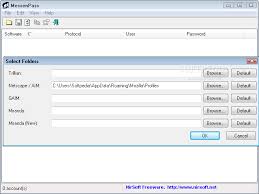
When you run MessenPass, it automatically detects the Instant Messenger applications installed on your computer, decrypts the passwords they store, and displays all user name/password pairs that it found in the main window of MessenPass. If from some reason, MessenPass fails to locate the installed Instant Messenger application, you can try to manually select the right folder of your IM application by using ‘Select Folders’ option (from the File menu).

On the main window of MessenPass, you can select one or more password items, and then copy them to the clipboard in tab-delimited format (you can paste this format into Excel or Open-Office Spreadsheet), or save them into text/html files.

You can also save the passwords of your Instant Messenger applications without displaying any user interface, by using the following command-line options:

/stext Save all instant messenger passwords into a regular text file.
/stab Save all instant messenger passwords into a tab-delimited text file.
/scomma Save all instant messenger passwords into a comma-delimited text file.
/stabular Save all instant messenger passwords into a tabular text file.
/shtml Save all instant messenger passwords into HTML file.
/sverhtml Save all instant messenger passwords into HTML file. (vertical)
/sxml Save all instant messenger passwords into XML file.


MessenPass allows you to easily translate all menus, dialog-boxes, and other strings to other languages.
In order to do that, follow the instructions below:

1. Run MessenPass with /savelangfile parameter:
mspass.exe /savelangfile
A file named mspass_lng.ini will be created in the folder of MessenPass utility.
2. Open the created language file in Notepad or in any other text editor.
3. Translate all menus, dialog-boxes, and string entries to the desired language.
4. After you finish the translation, Run MessenPass, and all translated strings will be loaded from the language file.
If you want to run MessenPass without the translation, simply rename the language file, or move it to another folder.

For more infortion read : from nullsoft and download you can get from : Download MessenPass in zip file.


SpeedConnect Internet Accelerator v.7.5: Internet Connection Optimization


Easy, Fast and secure optimize your internet connection speed. You can use this optimization software to speed connection Dial-Up Modem, DSL, Cable, Wireless and LAN internet connection other.

SpeedConnect Internet Accelerator is a Windows application designed to optimize and speed up your network connection and all activities related to the internet. Accelerate the opening page website and email, faster downloads, online game more smoothly, and improve the connection on Skype. Easy, safe and fast optimization of your internet connection.


Support OS : Windows® Vista™, XP, 2000.


SpeedConnect Connection Tester
Provides a quick way to analyze your Internet connection.

SpeedConnect Quick Optimizer’s Panel
Provides the fastest way to optimize your connection.

SpeedConnect Network Settings Panel
Provide access to the Network Settings.

SpeedConnect’s Extra Settings Panel
Provides access to manual settings to add extra.

REVIEWS
“SpeedConnect prevent fragmentation in the occurrence of transfer data and settings to optimize the TCP / IP on your Windows, in order to speed up browsing Web pages, e-mail, and downloads.”
Top 10 Internet Accelerators “PC World & CNN Computing

“If you’re bored because your internet connection slow, SpeedConnect is a safe one, quick and easy system to optimize the internet connection settings.”
WebAttack Review

“SpeedConnect can automatically work with and add a few extra settings that adjust in connection with the ISP we use the internet connection to be faster.”
InternetADVISOR

“… In a few words: Easy to use, AOL adapter support, online Help is good, support the LAN and Dun.”
ZDNet Reviews

DOWNLOAD : SpeedCon75_up [2.4Mb]
Membutuhkan .NET Framework Version 2.0 (22.4 MB)


SpamPal : Free Software for Filtering Spam


SpamPal is a mail classification program that can help separate your spam from the mail you really want to read.

SpamPal is free software, you can download and install it entirely free-of-charge. This isn’t a trial, or a crippled cut-down version to tempt you towards an expensive “full” version, or a package loaded with spyware to steal your personal details.

SpamPal sits between your email program and your mailbox, checking your email as you retrieve it. Any email messages that SpamPal considers to be spam will be “tagged” with a special header; you simply configure your email client to filter anything with this header into a separate folder and your spam won’t be mixed up with the rest of your email anymore.


SpamPal know what is spam and what isn’t by uses what are called DNSBL lists. Patterned after the famous MAPS RBL, these are lists of parts of the Internet that in one way or another facilitate spam. Any email you get from a machine on one of these lists has an increased probability of being spam. You can choose to use any or all of the freely-usable DNSBL lists.

If any of those machines is on one of the DNSBL lists you have chosen then that message will be tagged as spam. But SpamPal has a powerful whitelisting feature that allows you to ignore DNSBL listings for certain senders or for parts of the Internet. Because not everyone who uses a machine on a DNSBL list will be a spammer.

To use SpamPal you need :
1. A machine running Windows 95, 98, ME, NT, 2000, 2003 or XP.
2. A POP3 or IMAP4 mailbox.
3. A standard email program such as Outlook, Outlook Express or Eudora.

SpamPal does not work with:
* AOL
* Hotmail
* Yahoo
* Juno
* MSN
* Or any other proprietary mail system.

Source : spampal.org
Download Link : Here and Here

Note : Note that the manual is not with the SpamPal installation archive; you must read it online or download it..


Get and Download Free Karens Directory Printer 5.3.1


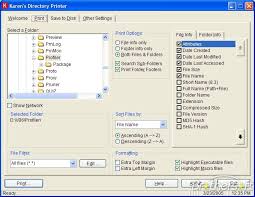
No more fumbling with My Computer or Windows Explorer, wishing you could print information about all your files. Karen's Directory Printer can print the name of every file on a drive, along with the file's size, date and time of last modification, and attributes (Read-Only, Hidden, System and Archive)! And now, the list of files can be sorted by name, size, date created, date last modified, or date of last access.

Enhancements/Bugs Fixed
Version 5.3.1: Fixed odd bug that prevented you from selecting a sub-folder of a folder found inside one of the "Special Folders" such as My Desktop.
Version 5.3.0: Added option to hide (not save or display) Hidden, System and/or Read-Only files and folders.

Version 5.2.9: Made another change that should fix the bug originally reported fixed in version 5.2.7.
Version 5.2.8: Improved handling of "remembered" UNC-style file names.
Version 5.2.7: Fixed bug that prevented proper sorting of files and folders by file size.
Version 5.2.6: Fixed bug that could cause program to crash if the last folder whose information was printed or saved doesn't exist when the program is restarted.
Version 5.2.5: Fixed bug that could cause the program to crash on computers with no available printers.
Version 5.2.4: Restored PTHash.dll file to installer, so program can once again compute and display MD5 and SHA-X hash values.
Version 5.2.3: Added warning message, when user attempts to print or save file information, with no file info items selected (ditto for printing/saving folder information with no folder info selected).
Version 5.2.2: Fixed bug that prevented program from displaying the settings folder, in the About window, when running under Windows 95, Windows 95 SE and Windows ME.
Version 5.2.1: Fixed bug that caused sorts by file creation date, date-last-modified and date-last-accessed to come out in the wrong order.


You can download from Karenware.com

MailWasher: Reliable, FREE Spam Blocker.


MailWasher is free to use and won't ever expire. It works with Outlook, Outlook Express and every other email program. MailWasher is the leader in spam filter software, and the easiest way to check and manage your e-mails before you download them. Use this powerful spam blocker software to effectively stop email spam. Discover the safe way to stop unwanted e-mails before they get to your computer.

There is no spy-ware contained in this program. MailWasher do not monitor your actions or email. When you register this program, MailWasher will not give your email address or personal details to anyone.


You will find this to be the easiest, most effective way to manage your incoming e-mails and stop spam. You will be amazed at how quickly you will like using MailWasher.

MailWasher is runs on Win 98 / Me / NT4 / 2000 / XP Home / XP Pro / Vista (all versions).

Features and Benefits
Delete. unwanted e-mails before you download to your computer. You'll be able to see who the email is from, the subject, and the attachment. This will enable you to decide if you want to delete the email or keep it. A great way to stop viruses, large attachments or to just delete unnecessary emails from getting to your computer.

Preview. Easily preview the message in your email to see what the sender has to say before downloading it to your computer. This ensures you won't download any nasty emails to your computer. Additionally, spam is marked in a red color, and your good email is marked as a green color for quick analysis.

Anti spam tools. Comprehensive anti spam tools ranging from your personal friends list and blacklist, customizable filters, external blacklists, bayesian spam filtering which quickly learns to distinguish your spam and good email and email virus filtering.

  • Friends List. Add your friends email addresses to MailWasher and they will always be recognised. You can even hide your friends from the screen so the spam is easy to recognise.
  • Bounce back unwanted e-mails so it looks as if your email address is not valid. This will make the sender think your address is no longer active so your name can be removed from their list. This unique feature is great for privacy and it couldn't be simpler!
  • Filtering. Effective filtering to automatically spot spam, plus it uses a customisable list of blacklisted e-mail senders and/or regular expressions to filter out potential spammer addresses and messages.
  • Bayesian spam filtering. This clever type of spam filtering learns which of your email is spam and which is not very quickly and accurately.

Recycle bin. If you accidentally delete an email, you can restore it back to your email account (Pro version only).

Fast download of messages, we have clocked speeds of 25 email message per second.

Simplicity. No flashy gimmicks, so easy to use that you won't feel like you have to learn a whole new program. In fact it has the familiar look and feel of Outlook Express. It's as easy as 1,2,3. Just check mail, mark for deletion/learning, then process mail.

Other features: Check mail at different intervals. Don't check mail at certain times. Play a sound when an email arrives, or be notified visually. Email log. Comprehensive help documentation on this site.

Download : MailWasher Here


Boost Your Internet Speed with Internet Turbo®


INTERNET Turbo ® is the AWARD-WINNING Internet solution, which is easily completed two issues of the Internet's most popular:
1. Performance of the slow connection.
2. Disconnect is often not desired.

INTERNET Turbo can prevent the data transfer protocol, TCP / IP fragmentation. With use, you can improve the performance of your internet connection up to 200% (we also get a report the user to 300% improvement).


NTERNET Turbo also has fiture Forever Connection, where this feature will prevent you from disconnected by your ISP (Internet Service Provider). Most Internet Service Providers have time off, they will decide on an internet connection.

Highlight
  • Supports all software and hardware adapters.
  • Easy menembalikan Windows default settings.
  • Wizards automatically configure dialup, LAN, ISDN, Cable, xDSL, and more.
  • Wizards to manually configure dialup, LAN, ISDN, Cable, xDSL, and more.
  • Easy to Make registry backup.
  • Improving MaxMTU, RWIN, TTL, Session Keep Alive, PMTU and NDI Cache.Mencegah being disconnected by your ISP (Internet Service Provider)
  • Includes a comprehensive help file.

INTERNET Turbo save much time and money. INTERNET Turbo is a tool for every person using an internet connection. INTERNET Turbo will increase the performance of any software associated with the Internet, such as browser / email programs, CompuServe, RealAudio, RealVideo, ICQ and others. It also does not prevent the separation desired.

Website : http://www.clasys.com/internet_turbo.html
Download Link : Here or Here

A-one DVD Creator 5.85


Developer: A-one Global Creativity
License: Demo , Price $ 24.95
Size / OS: 11.5 MB, Windows All

A one DVD Creator description
An expert and easy-to-used Windows application that creates your favorite DVD movies directly

A-one DVD Creator is an expert and easy-to-used Windows application that creates your favorite DVD movies directly.

With A-one DVD Creator, you may transcode and burn internet movie files into DVD disc, or you can save file to hardisk.

With DVD encoding and burning engine integrated you can easily Merge up to 4 hours of multiple movies or episodic files to standard MPEG2 Video and burn it into a DVD R/RW disc that playable on car or home DVD player.

A-one DVD Creator supports
the most popular formats on the internet such as Divx, Xvid, Mov, AVI, WMV and streaming formats.

A-one DVD Creator is a 1 click solution to burn DVD movie from huge internet movie resources.

Here are some key features of "A one DVD Creator":

· Create AVI, MPEG, MOV, DIVX, WMV to standard DVD without losing quality.
· Support Divx, Xvid, AVI, MPG, MOV, WMV video format.
· Converts each chapter to an individual file.
· Support Setting the start position and end position of source file to create.
· User-friendly interface without any complicated settings.
· Estimate output file size before creation.
· Automatically Shutdown Computer After Long Time Conversion


Requirements:

· Intel Pentium II 1GHz or above
· 128 MB RAM or above


Limitations:

· 20 percent file size conversion

Download Location

Optimal Kinerja RAM Dengan Power Memory Booster

Power Memory Booster dirancang untuk membuat komputer Anda berjalan lebih cepat dan mengurangi crash. Dapat mengoptimalkan RAM untuk membuat komputer Anda berjalan lebih cepat dan mengurangi crash, Anda akan meningkatkan performa sistem dengan membersihkan konten RAM Anda dan memungkinkan Anda mengetahui informasi CPU, penggunaan memori, proses, dan aplikasi yang berjalan di komputer Anda.

Power Memory Booster memiliki manajemen memori yang pintar yang mana program ini akan menjaga komputer (PC) berjalan lebih baik, lebih cepat, dan lebih lama. Power Memory Booster terus memantau keadaan memori komputer Anda. Hal ini juga menampilkan real-time grafik fisik memori yang tersedia dan Pagefile. Secara keseluruhan, perangkat lunak ini akan membantu Anda membebaskan memori fisik, sehingga Anda dapat mempercepat komputer Anda dan membuatnya dapat berjalan secara optimal.

Download DFX Audio Enhancer 9.012

DFX enhances your music listening experience by improving the sound quality of MP3, Windows Media, Internet radio and other music files. With DFX you can transform the sound of your PC into that of an expensive stereo system placed in a perfectly designed listening environment.


DFX Features :
DFX Audio Enhancement Features:
• Advanced DSP Sound Enhancement Effects
• Speakers and Headphones Optimization
• Finely-tuned, Customizable Music Presets
• Dynamic Sound Spectrum Analyzer
• Powerful Audio Processing Modes
• Stylish, Shapely Skins
• Space Saving Mini-mode Interface
• Presets Backup and Restore
• Preset Song Associations
• 5.1/7.1 Surround Sound Support
• 64-Bit Windows Support

DFX dramatically improves your digital audio experience with:
• 3D Surround Sound - Immerse yourself inside the music
• Stereo Ambience - renew lost stereo depth High Fidelity Restoration
• Dynamic Gain Boosting - pump up the volume
• Headphones Optimization - Hear more pleasant, natural sounds with headphones
• Customizable Music Presets - Select finely-tuned settings for many styles of music
• Booming HyperBass - produce deep, rich bass sounds
• High Fidelity Restoration - eliminate that "muffled" sound
• Spectrum Analyzer - "See" DFX enhance your sound
• Music and Speech Modes - Get optimized sound for any type of audio
• Customizable Skins - Choose from hundreds of skins

Advanced DSP Sound Effects:
* Harmonic Fidelity Restoration.
Adding Fidelity to your audio eliminates the "muffled" sound that is an artifact of the data compression algorithms used in Internet audio formats. DFX compensates for this loss of high frequency fidelity by carefully regenerating the missing high frequency harmonics in the audio. This harmonic restoration is performed using patent-pending technology that carefully synthesizes high frequency harmonics to replace the harmonics lost during the encoding process.

* Ambience, Stereo Imaging.
Adding Ambience to your audio compensates for the lost or diminished stereo depth that is the result of closely located speakers, poor listening environments, and sonic losses due to data compression of Internet audio formats. DFX compensates for the reduced stereo imaging and depth of PC audio by carefully regenerating the ambience and stereo depth. This same ambience processing has been used by Grammy winning engineers of artists such as Alanis Morissette and Ella Fitzgerald.

* 3D Surround Sound.
Using the 3D Surround Sound component adds amazing depth and body to your audio, compensating for monitoring limitations and sonic losses due to data compression. With 3D Surround processing the sounds will surround you, virtually putting you inside the music! 3D Surround enhances the sound played on conventional 2-speaker systems and makes even small PC speaker systems sound larger and richer. It is also fully compatible with Surround Sound playback systems.

* HyperBass.

* Dynamic Gain Boosting.


New and improved features in DFX 9:
* Automatic preset selection with associated songs
* Backup and restore personal presets
* 10 band audio spectrum analyzer
* Improved responsiveness and user control
* Gadget style user interface option
* 64-bit Windows support

Link 1 : DFX Audio Enhancer v9.012 for Windows Media Player
Link 2 : DFX Audio Enhancer v9.012 for RealPlayer
Link 3 : DFX Audio Enhancer v9.012 for Winamp
Link 4 : DFX Audio Enhancer v9.012 for J. River Media Center
Link 5 : DFX Audio Enhancer v9.012 for Yahoo! Music Jukebox
Link 6 : DFX Audio Enhancer v9.012 for Musicmatch Jukebox


Official Homepage : http://www.fxsound.com

Get Ubuntu with Your Favourite Applications


Super Ubuntu is just Ubuntu 8.10 (Intrepid Ibex), but it also includes:

* System and application updates: all updates released for Ubuntu + GIMP 2.6.3 + OpenOffice.org 3 + Firefox 3.0.4

* Better Multimedia Support: MPlayer and VLC, DVD-playback, MP3 support and other multimedia codecs

* Better Internet experience: aMSN, aMule, Adobe Flash player and Opera


* Support for portable applications/other installation methods: Autopackage, SFS Technology, Smart Package Manager, Wine and Zero Install

* Support for more technologies: Java RE, Microsoft Office 2007 file formats, others…

* Graphical interfaces/managers: compizconfig-settings-manager (Compiz), Gufw (Uncomplicated firewall), ndisgtk (NDISwrapper) and padevchooser (PulseAudio)

* Utilities: Adobe Reader, EnvyNG, Furius ISO Mount, GParted, NDISwrapper, Ubuntu Tweak and StartUp-Manager

* Extra repositories

Applications Included

Adobe Reader 8.1.3
aMule 2.2.2
aMSN 0.97.2
Autopackage 1.2.5
Brasero 0.8.4
compizconfig-settings-manager (to configure the settings of Compiz and the desktop effects)
EnvyNG (command line version)
Firefox 3.0.4
Furius ISO Mount 0.11.1.0
GParted 0.3.8
GIMP 2.6.3
gufw (GUI for uncomplicated firewall) 0.20.6
MPlayer (media player)
NDISwrapper and ndisgtk
OpenOffice.org 3
Opera 9.63
padevchooser (the graphical interface for PulseAudio)
RealPlayer 11
SFS Technology 0.3.0.4
Smart Package Manager 1.1.1
Skype 2.0.0.72
StartUp-Manager 1.9.11
Mozilla Thunderbird 2.0.0.16
ubuntu-restricted-extras (Java runtime environment, codecs, MP3 support, support for DVD-video, flash player…)
Ubuntu Tweak 0.4.4
VLC Media Player 0.9.4
Wine 1.1.10
Wine-Doors 0.1.2
Zero Install 0.3.7

Download Super Ubuntu from here

Source From : kampoenk.com , hacktolive

Ashampoo Office 2008 3.10 with MultiLanguage


The Complete Office Package

No computer is properly complete without its own Office package. Office assists in the compilation of texts of all kinds, in the completion of spreadsheet calculations and in the preparation of expressive presentations. In these tasks, Microsoft Office is the generally accepted standard, as its formats are established and the functions it offers are continually required. However: many users are unable to afford the Office suite.

This is where the Ashampoo Office 2008 steps in. The program only occupies a limited amount of storage space on the hard drive, is very stable and still offers all of those Office functions which genuinely need to be used in private or in business environments. A fair price that all users can afford without problem also ensures that the Ashampoo Office 2008 is rapidly winning new friends. Its simple menu prompting and ease of use allows users of other Office solutions a problem-free switchover.
It goes without saying that the most important thing is the fact that reading and writing in the original Word, Excel and PowerPoint files without losses of content or in terms of formatting presents no problem for the Ashampoo Office 2008. That means that every user of the Ashampoo Office is able to open, modify and then save a Word file in exactly the same way as if the work had been done in Word itself.
Ashampoo Office 2008 is supplied with the word processing tool Ashampoo TextMaker, the spreadsheet program Ashampoo PlanMaker and – brand new in the current version – the presentations software Ashampoo Presentations.

Ashampoo TextMaker, PlanMaker and Presentations
As a word processing program, Ashampoo TextMaker is able to cope both with long and short texts. The program is able to lay out a table of contents, an index and tables, can import graphics and is also able to place 3D texts. Thanks to the integrated addresses database, drafting serial letters presents no problem. Web pages are also easy to create using the program. The program has also won considerable praise thanks to its very high quality spell check system.
With Ashampoo PlanMaker, number games of all kind no longer present any problems. The spreadsheets offer countless formulae which are a great help with automatic calculations. Its implementation of highlighted columns of figures in expressive 2D and 3D diagrams is particularly effective.
Ashampoo Presentations is a new product. The presentations program brings images and texts together, and using the pre-sets, can easily generate a visual presentation which can then be played back on the PC monitor and can also easily be exported or printed out.

Ashampoo Office 2008: Now with PDF Export and Mailing Assistant
Lots of things have changed in the new Ashampoo Office 2008. And it isn’t just down to the presentation program Ashampoo Presentations, which is a completely new addition to Office.
A particular wish of users was PDF export, something which is now available in all three programs. This means exporting content so that users can open it and print it out is no longer a problem, as long as s/he has installed the free Adobe Reader on their computer.
The object-based exchange of data between the three Office applications is also brand new. This means PlanMaker tables can be easily integrated into an Ashampoo TextMaker document, for instance. A single mouse click on the object is enough at any time to be able to work on it in the original application.
One great extra is the new mailing assistant which is immediately available in Ashampoo TextMaker 2008. This helps in the printing of envelopes and spares its owner the annoying sizing and positioning of address fields.

Ashampoo Office 2008: Take it with you on a USB stick
Ashampoo Office 2008 has one decisive advantage over other office suites. You can install it on a USB stick and take it with you wherever you go. If you want to use another computer in the office, your laptop at home, the PC in the hotel lobby or the Internet cafe terminal, it's enough to just plug in the USB stick and continue your office work seamlessly. Installation unnecessary.
Many users are already using this feature to always carry their most important documents and the work environment they are used to with them.

An Overview of the Additional Functions

* improved master pages with texts
* bordering and shading whole pages
* page breaks now independent of printer
* improved import and export of Microsoft Word files
* the reading and also the exporting of OpenDocument files
* new template manager manages paragraph and line templates
* new print preview function to control the printed image prior to print out
* several pages (2, 4, 6, 8, 16) on a single printout to save paper

Included Languages

German German (Ashampoo )
English English (Ashampoo )
Dutch Dutch (Ashampoo )
French French (Ashampoo )
Hungarian Hungarian (Ashampoo )
Russian Russian (Ashampoo )
Italian Italian (Ashampoo )
Portuguese Portuguese (Ashampoo )
Spanish Spanish (Ashampoo )
Turkish Turkish (Ashampoo )
Chinese (simplified) Chinese (simplified) (Ashampoo )
Japanese Japanese (Ashampoo )
Bulgarian Bulgarian (Ashampoo )

Operating Systems: Windows® 2000 / XP/ Vista 32

Download Here From RapidShare

Get Avira AntiVir Removal Tool


Avira AntiVir Removal Tool for Windows 3.0.1.16

Avira AntiVir Removal Tool for Windows is a free, easy-to-use disinfection tool, specifically designed to remove a series of security threats from your system, such as Worm.Sober.J/P/Y and W32.Stanit.A, Worm.NetSky.P/AA/B.1/C/D.Dam/P/X, Worm.Mytob.IN.2/KS Repairing function: it fixes infected files, only if not severely damaged by the malware's actions. Simple operation: you simply have to unpack it and then start it by double click.

Released: 2006-12-12
License: Freeware
Publisher: Avira GmbH
Language: English, German
Platform: Windows
Requirements: Windows 98/ME/NT4/2000/XP/2003 Server

Avira AntiVir Removal Tool 3.0.1.16
For all those experiencing the damaging effects of a virus infection, Avira's researchers have prepared a free removal tool, which can be used to eliminate major distinct threats. Avira AntiVir Removal Tool for Windows is a free, easy-to-use disinfection tool, specifically designed to remove a series of security threats from your system, such as Worm.Sober.J/P/Y and W32.Stanit.A. Released: 2008-06-11
License: Freeware
Publisher: Avira GmbH
Language: English, German
Platform: Vista, Windows
Requirements: Windows 2000, XP, 2003, Vista and 2008 Server.